

Ardot Enterprise Seats & Permissions Guide
Version: V0.1 (Draft) Last updated: October 27, 2026 Scope: Ardot enterprise workspaces activated through WorkBuddy Enterprise. The seat claim and allocation flow in this guide assumes active WorkBuddy Flagship entitlements, and does not apply to the Individual edition, Standalone Team edition, or private deployments.
Ardot Enterprise is part of the WorkBuddy Enterprise suite. During the promotion period, Ardot seats are a limited-time free benefit of WorkBuddy Flagship, available either as a system grant or a 0-yuan purchase.
This guide covers seat entitlements, how to claim and assign them, and the edit permission rules for team files.
- Enterprise members: read I'm an enterprise member to learn how to verify your permissions, obtain a design seat, and handle usage restrictions.
- Enterprise administrators: read How seats are obtained to learn about system grants and 0-yuan purchases; read I'm an enterprise administrator to learn how to view, purchase, and assign enterprise seats.
Table of contents
- About seats
- Permission overview
- I'm an enterprise member
- I'm an enterprise administrator
- FAQ
- How long is the limited-time free benefit valid
- Do I need a design seat just to view and comment
- Do administrators also need a design seat
- If I have a WorkBuddy seat, why do I also need an Ardot seat
- Can a developer seat edit files
- What happens to files when a seat expires or is reclaimed
- Does this affect my personal drafts
- Quick lookup
About seats
How seats are obtained
- System grant: existing seat quota and member assignments can be checked through the entry described in View enterprise seats.
- 0-yuan purchase: when more seats are needed, the enterprise administrator purchases them as required. See 0-yuan seat purchase.
What changes in this upgrade
After the upgrade, Ardot separates admin role, seat, and file permission:
- Admin role: controls whether you can manage an enterprise, team, and its members.
- Seat: determines the type of collaboration capability you have. A design seat, for example, entitles you to edit team files.
- File permission: determines which specific files you can view or edit.
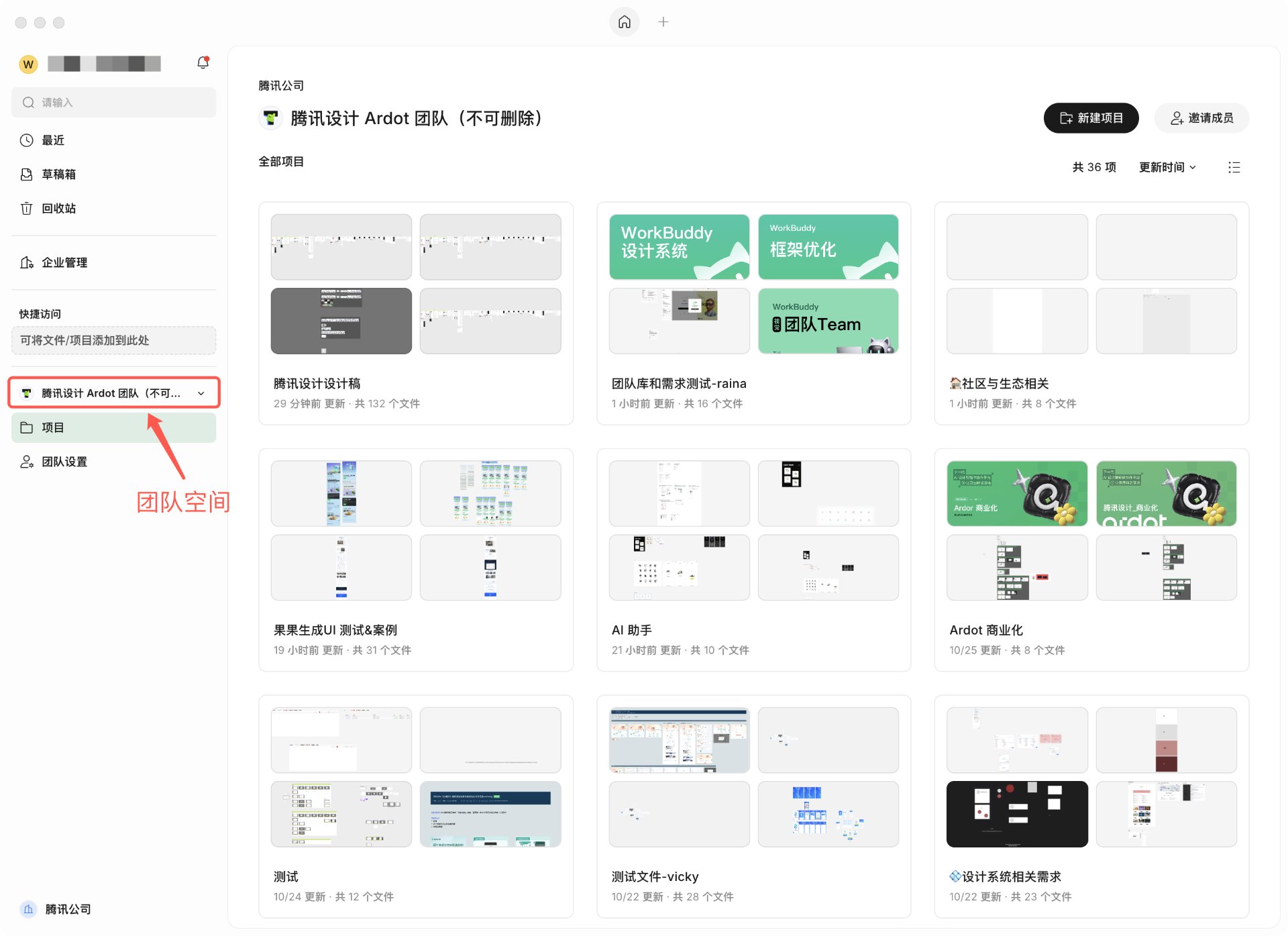
To edit a team file inside an enterprise, you need both an active design seat on that enterprise and edit permission on that file. Admin role, a WorkBuddy seat, or file edit permission alone cannot replace a design seat.
Scenarios that require a design seat
Typical scenarios that need a design seat:
- Create, import, or edit a design file in an enterprise team space.
- Modify design content, components, or styles in a team file.
- Use AI to modify a team file; this additionally requires the corresponding WorkBuddy feature, seat, and credit conditions.
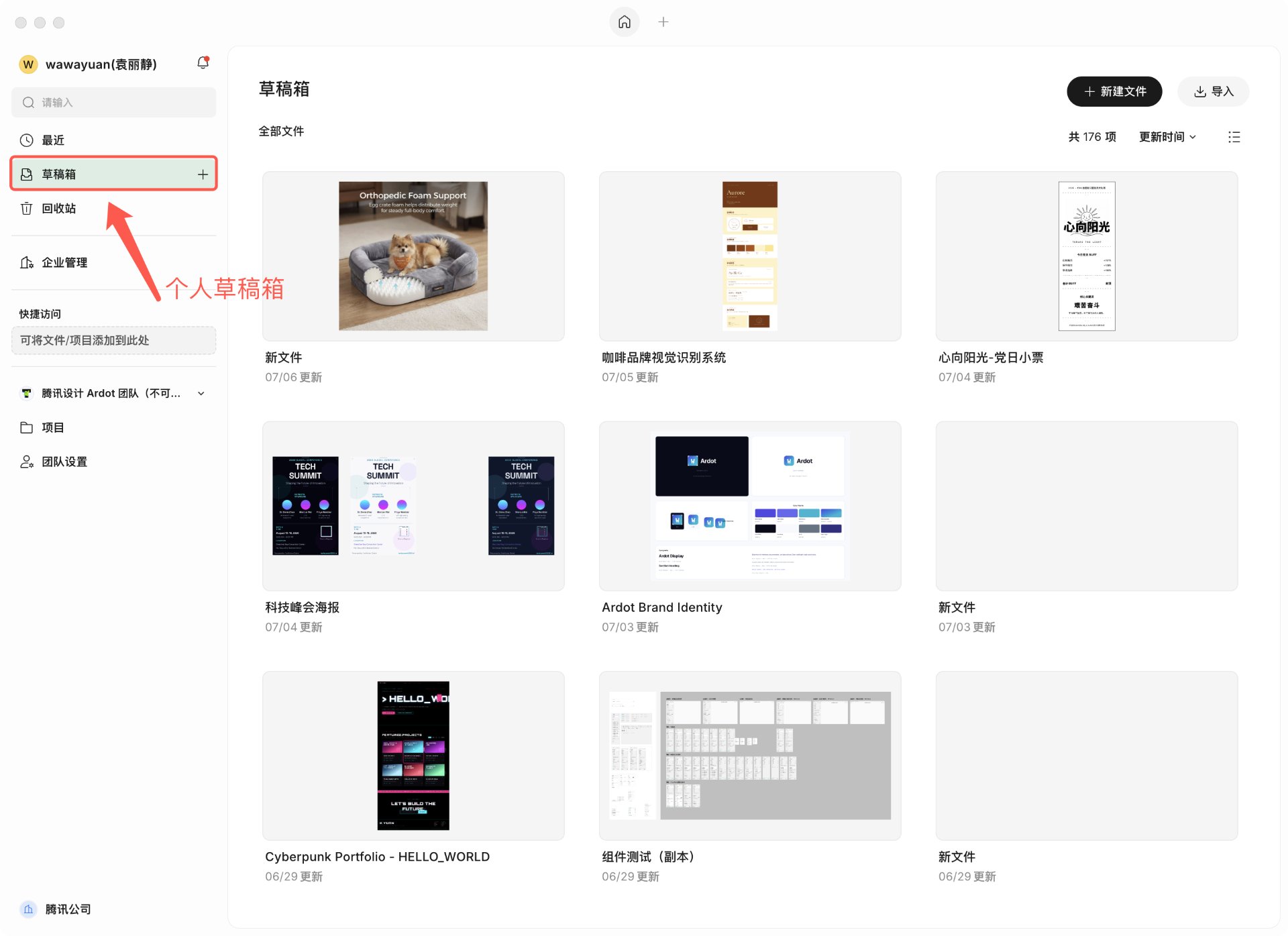
Scenarios that do NOT require a design seat because of this upgrade:
- Viewing files you already have access to.
- Posting comments on files you have access to.
- Editing your own files in the personal drafts area.
Permission overview
Admin role vs. seat
Admin roles exist to manage an enterprise or team; seats provide the matching collaboration capability. They are not interchangeable.
| Role or permission dimension | What it does | What it does NOT mean |
|---|---|---|
| Enterprise owner / enterprise admin | Manages the enterprise and its members per their authorization; admins with seat-management rights can handle enterprise seats. | Does not automatically grant a design seat, and does not grant edit rights on every file. |
| Team owner / team admin | Manages a specific team and its members. | Does not grant permission to allocate enterprise seats. |
| Regular member | Collaborates based on assigned seats and file permissions. | Receiving a design seat does not make the member an administrator. |
| File owner / editor / viewer | Determines access and operations on specific files. | A file owner or editor still needs an active design seat to edit team files. |
Design seat vs. developer seat
| Seat state | Suited for | Can edit team files? |
|---|---|---|
| Design seat | Design file creation, editing, and team design collaboration. | Yes, but you still need edit permission on the file or space. |
| Developer seat | Fetching design resources and dev collaboration; capabilities depend on product entitlement and file settings. | No. Does not grant edit permission on design files. |
| No design or developer seat | Viewing files you have access to and participating in comments. | No. Does not provide seat-based edit rights on enterprise team files. |
Enterprise viewing is the default access ability. You do not need to purchase a design or developer seat just to view, but file access authorization is still required.
How seats relate to file permissions
Editing a team file requires an active design seat AND file edit permission.
| Design seat | File authorization | Result |
|---|---|---|
| Active | Edit permission | You can edit the file. |
| Active | View-only | You can view but not edit; a user authorized to manage file collaboration must grant edit permission. |
| Unassigned or expired | Edit permission | You cannot edit the team file; an enterprise administrator must handle the design seat. |
| Any state | No access | You cannot open the file by seat alone; you must first be granted file access. |
Common operations and required seats
The following applies to team files inside an enterprise. Personal drafts follow their own rules.
| Operation | Design seat required? | Additional requirements |
|---|---|---|
| View a file | No | Granted access to the file. |
| Post a comment | No | Access to the file, and compliance with the applicable comment rules. |
| Create or import a file in a team space | Yes | Appropriate permission on the target space. |
| Edit design content, components, styles | Yes | Edit permission on the file. |
| Use AI to modify a team file | Yes | Edit permission on the file, plus the required WorkBuddy feature, seat, and credit conditions. |
| Share or adjust collaborators | Not seat-only | File management permission, in line with enterprise sharing rules. |
| Copy, move, or delete | Case by case | Depends on file ownership, collaboration role, copy settings, and source/target space rules. |
| Fetch design resources | Depends on seat benefits | File access, in line with resource fetch, copy, or export settings. |
I'm an enterprise member
Where do I check my seat status
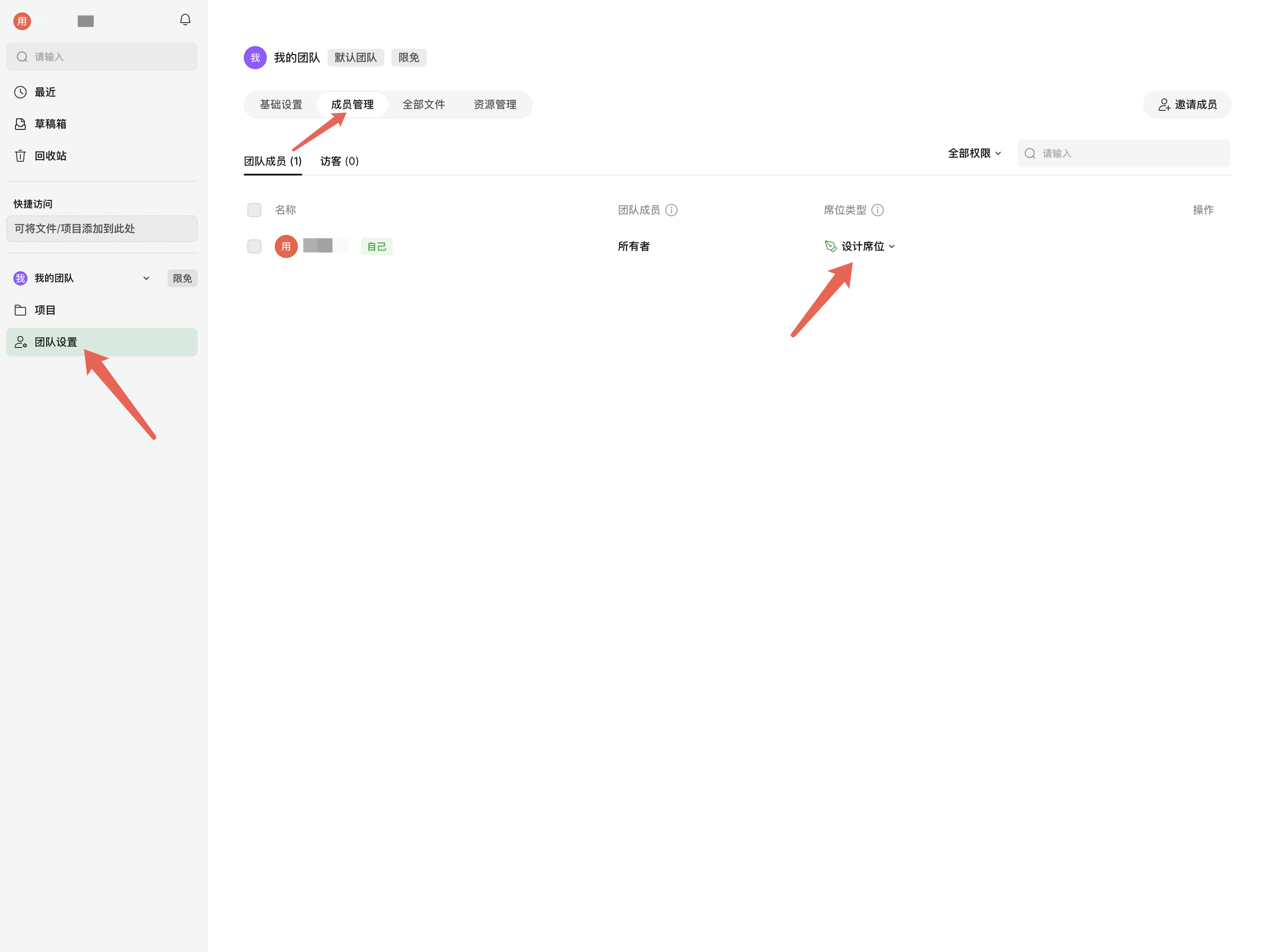
Go to Team Settings → Member Management in your current team, find the entry marked "self", and read the Seat type column.
How do I get a design seat if I don't have one
Contact your enterprise administrator to assign you a design seat. For administrator steps, see the I'm an enterprise administrator section.
Why can't I edit a file I used to be able to edit
After the upgrade, editing a team file requires an active design seat. If you previously could edit the file but no longer can, contact your enterprise administrator to verify whether your design seat is still valid.
If the page says file edit permission is missing, click Request edit permission and follow the prompts.
I'm an enterprise administrator
Ardot Enterprise is part of the WorkBuddy Enterprise suite and shares the enterprise admin console with WorkBuddy, so you manage suite members and seats in one place without maintaining two consoles.
Therefore, Ardot seats are claimed, purchased, assigned, and reclaimed in the WorkBuddy enterprise console.
This section is for administrators with enterprise seat-management rights. Having only a team admin role is not enough to manage enterprise seats.
View enterprise seats
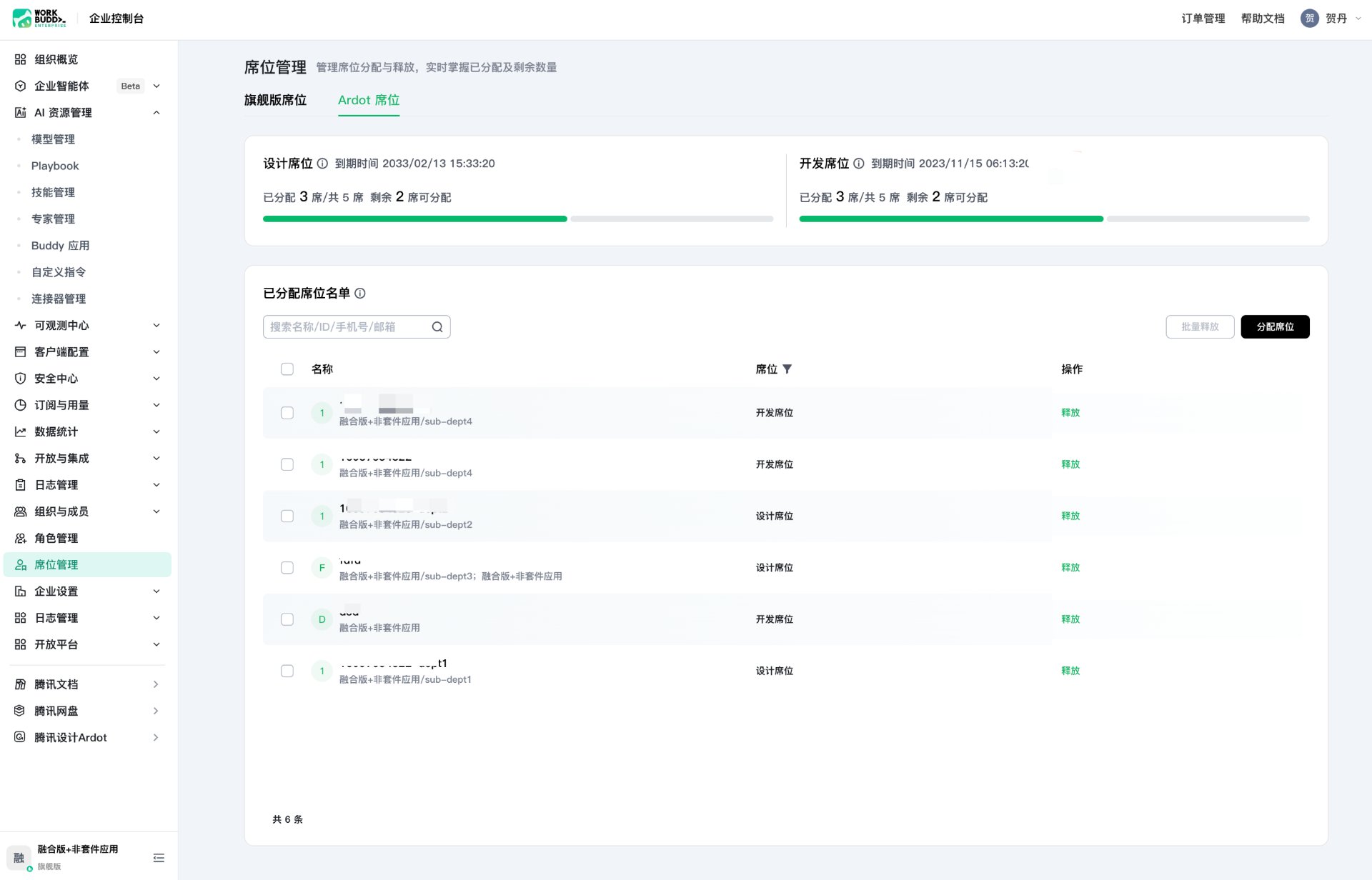
Go to WorkBuddy enterprise console → Seat Management → Ardot Seats to view totals, assigned counts, remaining quota, and the member list for both design and developer seats.
0-yuan seat purchase
If you already have system-granted or purchased quota available, you don't need to buy more — go straight to Assign seats to members; members who already hold a valid seat don't need a new assignment. When you do need more quota, follow the steps below.
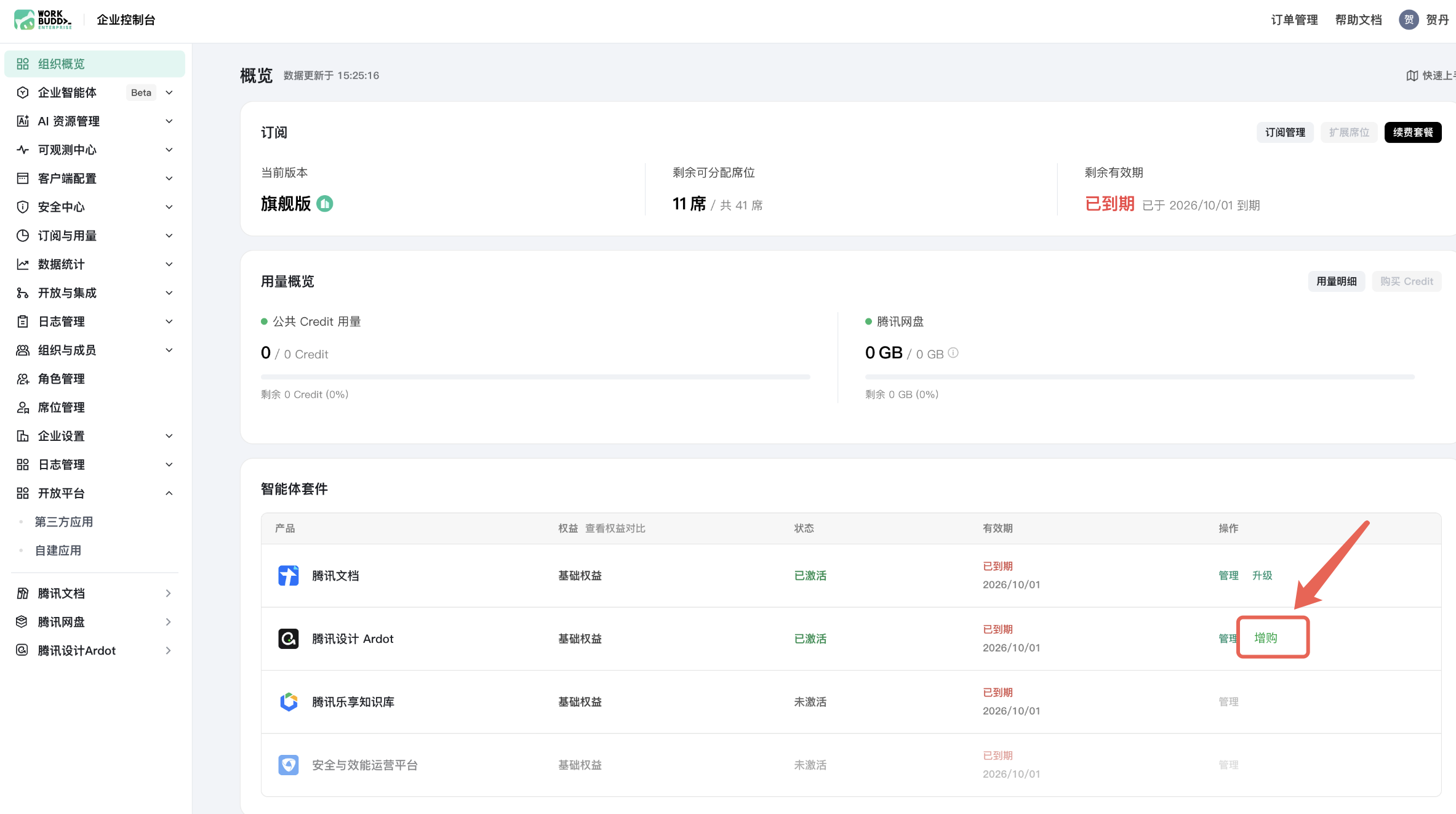
During the 2026 promotion, eligible enterprises can purchase Ardot design or developer seats at 0 yuan per the campaign rules. You still need to complete the order flow, and then assign the purchased seats to specific members.
Open WorkBuddy enterprise console, and find the Ardot seat purchase entry on the organization overview page.
Pick seat type and quantity. For members who need to edit team files, choose Design seat and buy as many seats as the number of editors you need; developer seats do not provide file edit capability.
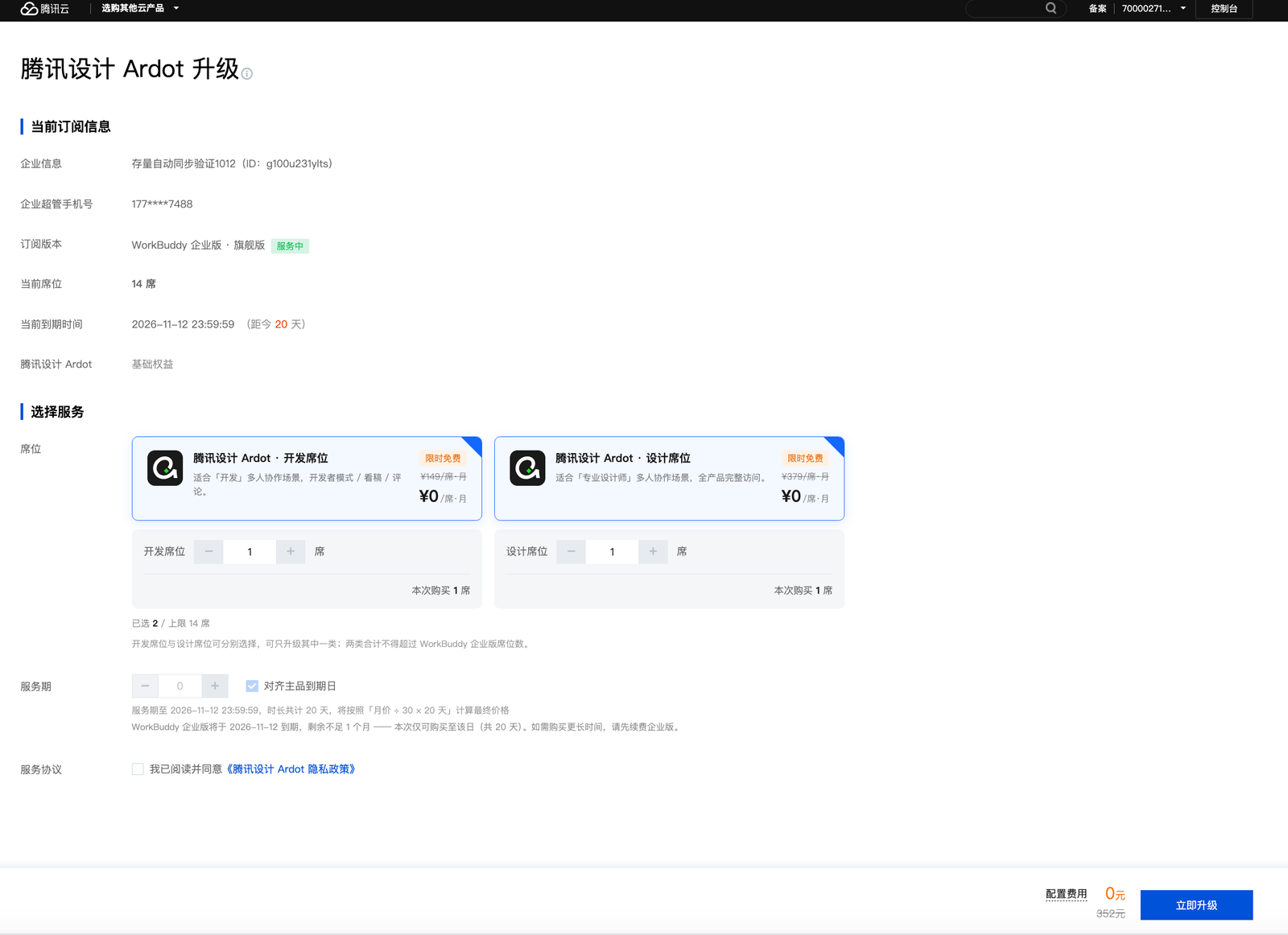
Confirm the service term and 0-yuan order amount, complete the purchase, and continue with Assign seats to members.
Assign seats to members
Once the enterprise has seat quota, go to WorkBuddy enterprise console → Seat Management → Ardot Seats, click Assign seats, choose the seat type and members, and submit. For members who need to edit team files, assign the Design seat.
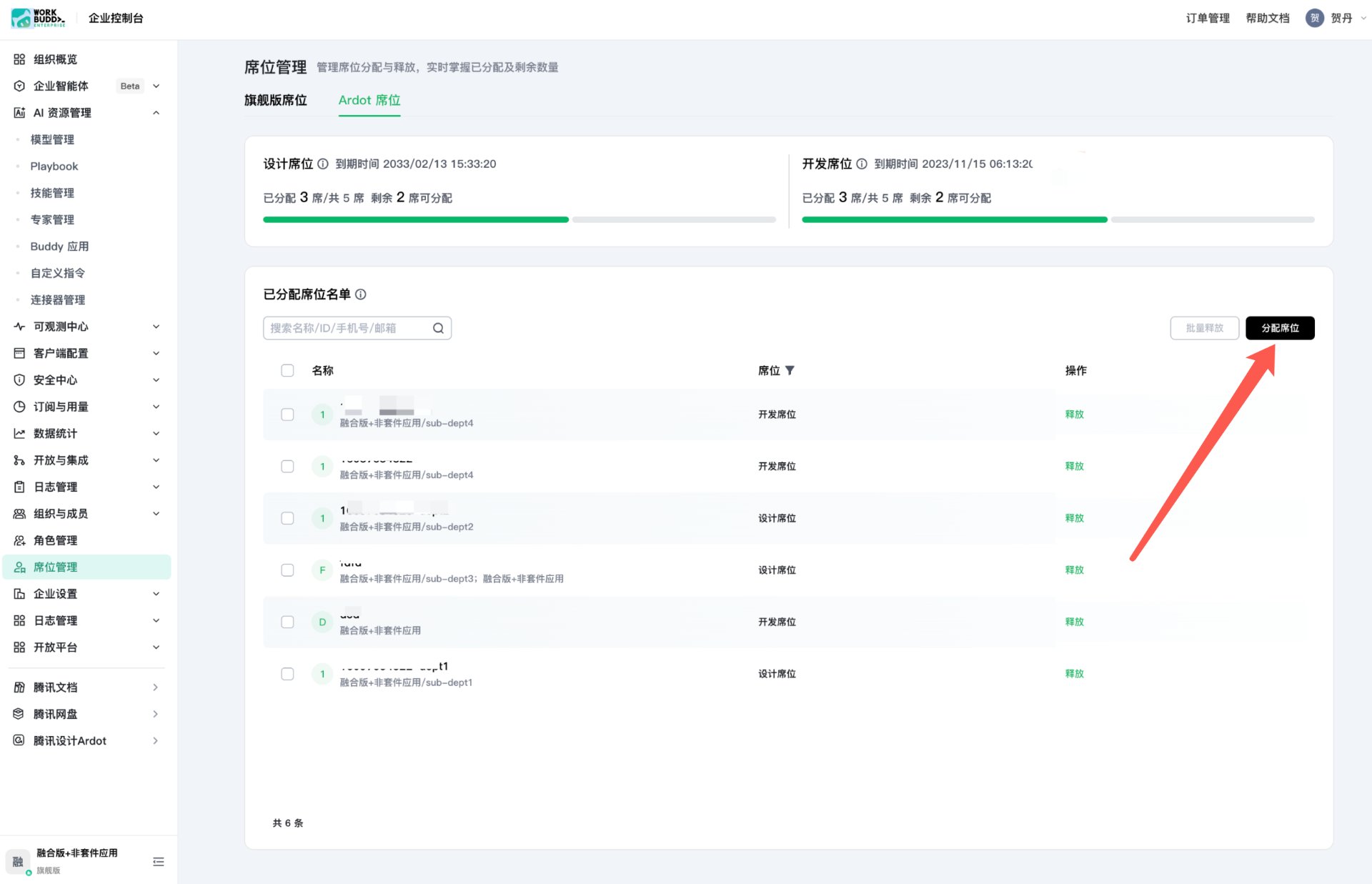
If the member does not yet hold a valid WorkBuddy Flagship seat: first go to Seat Management → Flagship seats to assign one, then return to the Ardot seat page to assign the Ardot seat. If the enterprise's WorkBuddy seat quota is insufficient, reallocate or purchase more first.
Resolve member permission issues
Find the member's situation below and click into the referenced step for the full flow.
| Member report | Resolution |
|---|---|
| Can view, can't edit | First use View enterprise seats to locate the member's seat record; if no design seat has been assigned, follow Assign seats to members. If the file page says edit permission is missing, have the member click "Request edit permission". |
| Seat is assigned but editing still fails | Use View enterprise seats to find the assignment, confirm the seat is a design seat and that the enterprise and member account match the ones actually used. If the file page says edit permission is missing, follow Why can't I edit.... If the seat is expired or the cause is unclear, submit a ticket through the entry at the bottom. |
| Member missing from the assignment list | If the member does not yet have a valid WorkBuddy Flagship seat, assign one in WorkBuddy enterprise console → Seat Management → Flagship seats first, then return to the Ardot Seats page — see Assign seats to members. If the member has a valid Flagship seat but still cannot be selected, submit a ticket. |
| Quota insufficient | Use View enterprise seats to check remaining quota by type; top up with 0-yuan seat purchase, then follow Assign seats to members. |
| Only some files cannot be edited | Have the member open the restricted file. If it says file edit permission is missing, follow Why can't I edit... via "Request edit permission". If it says the design seat is missing, handle the seat for the enterprise that owns the file via Assign seats to members. |
| Manual editing works, AI does not | If the page says the WorkBuddy seat is invalid, handle the Flagship seat as described in Assign seats to members; for other feature or credit issues, use the Tencent Cloud ticket entry. No need to re-claim the Ardot design seat for this reason. |
If an issue remains unresolved, enterprise administrators can submit a ticket via the Tencent Cloud ticket entry.
FAQ
How long is the limited-time free benefit valid
The seat benefit for this campaign runs through December 31, 2026 at the latest. The actual available window is also bounded by the enterprise's WorkBuddy main-product term, so not every enterprise can use it through the end of the year. The post-expiry usage model will follow the official announcement.
Do I need a design seat just to view and comment
No. As long as you have file access and comply with the enterprise rules, you do not need a design seat to view or comment.
Not having a design seat does not mean you can access every file inside the enterprise — file authorization and sharing scope still apply.
Do administrators also need a design seat
Yes. Enterprise administrators and team managers also need an active design seat and edit permission on the file to edit a team file.
Admin role determines which enterprise or team affairs you manage; it does not replace file edit eligibility.
If I have a WorkBuddy seat, why do I also need an Ardot seat
A WorkBuddy Flagship seat is a prerequisite for being assigned an Ardot enterprise seat, but they are not the same authorization.
Within the Ardot quota, the enterprise administrator still needs to further assign design or developer seats to members. Holding a WorkBuddy seat alone does not grant edit rights on Ardot team files.
Can a developer seat edit files
A developer seat does not grant edit permission on design files. It is for fetching design resources and dev collaboration; capabilities depend on product entitlement and file settings.
If you need to edit team files, ask your enterprise administrator to switch you to a design seat and confirm that you have edit permission on the file.
What happens to files when a seat expires or is reclaimed
The capabilities tied to that seat are restricted. After a design seat expires or is reclaimed, your prior file edit authorization alone no longer lets you keep editing team files.
This seat control does not delete existing files just because a seat has expired, been reclaimed, or was never assigned. Whether you can still view, comment, or perform other operations is still determined by file authorization, enterprise state, and the relevant rules.
To resume editing, the enterprise administrator needs to restore entitlements and member assignments. Restoring a seat does not expand the original file authorization.
Does this affect my personal drafts
This enterprise seat control does not change the basic editing rules of your personal drafts. Editing your own files in personal drafts does not require an enterprise design seat.
Once a file enters an enterprise team collaboration space, team file rules apply. AI features in personal drafts still require the corresponding WorkBuddy eligibility, credits, and activation — not every AI feature is unlimited.
Quick lookup
Find the situation that matches you, and click the referenced step for the resolution.
| Your situation | Resolution | Reference |
|---|---|---|
| I can still edit normally | Keep using Ardot; no reassignment needed. | No action required. |
| I can only view a file, no design seat yet | Contact the enterprise administrator to verify eligibility and assign a design seat. | Get a design seat |
| I have a design seat but still can't edit | Verify enterprise, account, validity, and file edit permission. | Troubleshoot edit restrictions |
| I only need to view or comment | No design seat is needed once file access is granted. | View and comment |
| I only edit my own personal drafts | No enterprise design seat is needed; AI conditions apply separately. | Personal drafts |
| I'm an administrator handling member reports | Triage by edit or feature restriction type. | Resolve member permission issues |